Import your mistakes from Tarteel
Bring the mistakes the Tarteel app heard in your recitations into QuranPortal, where each one is marked on your mushaf and repeats stand out.
For students, parents, teachers, and school admins Updated
On this page
If you practise with the Tarteel app, it has been noting the mistakes it heard as you recited. You can bring them into QuranPortal, where each word Tarteel marked becomes a mistake on your mushaf. A word you got wrong again and again shows as a bigger problem, so you can see at a glance where to revise.
Get your data from Tarteel
-
Ask Tarteel for a copy of your data
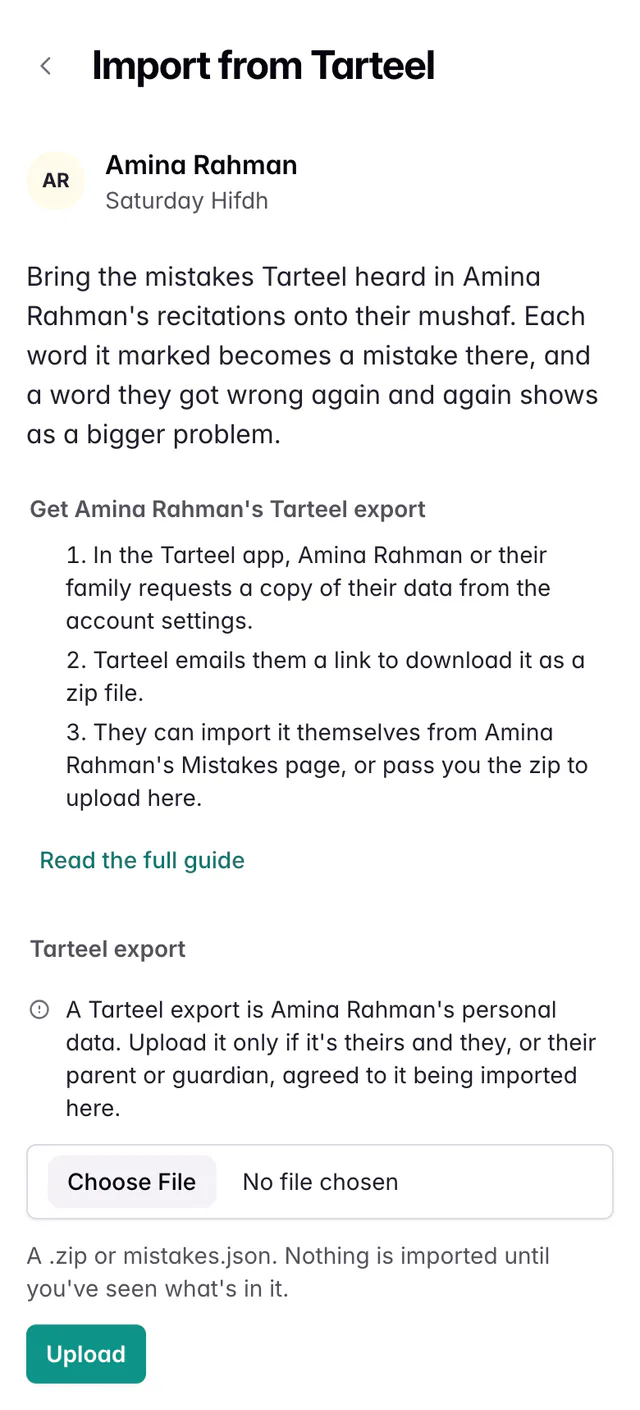
In the Tarteel app, open your account settings and request a copy of your data.
-
Download the zip
Tarteel emails you a link. Download the zip file it leads to. If your computer opens the zip on its own, you’ll find a data folder inside, with a file called mistakes.json; that file on its own works too.
Upload it to QuranPortal
-
Open Import from Tarteel
Go to Settings and choose Import from Tarteel, or use the same link on your Mistakes page.
-
Choose the file
Choose the zip, or mistakes.json, and press Upload. Nothing is imported yet.
-
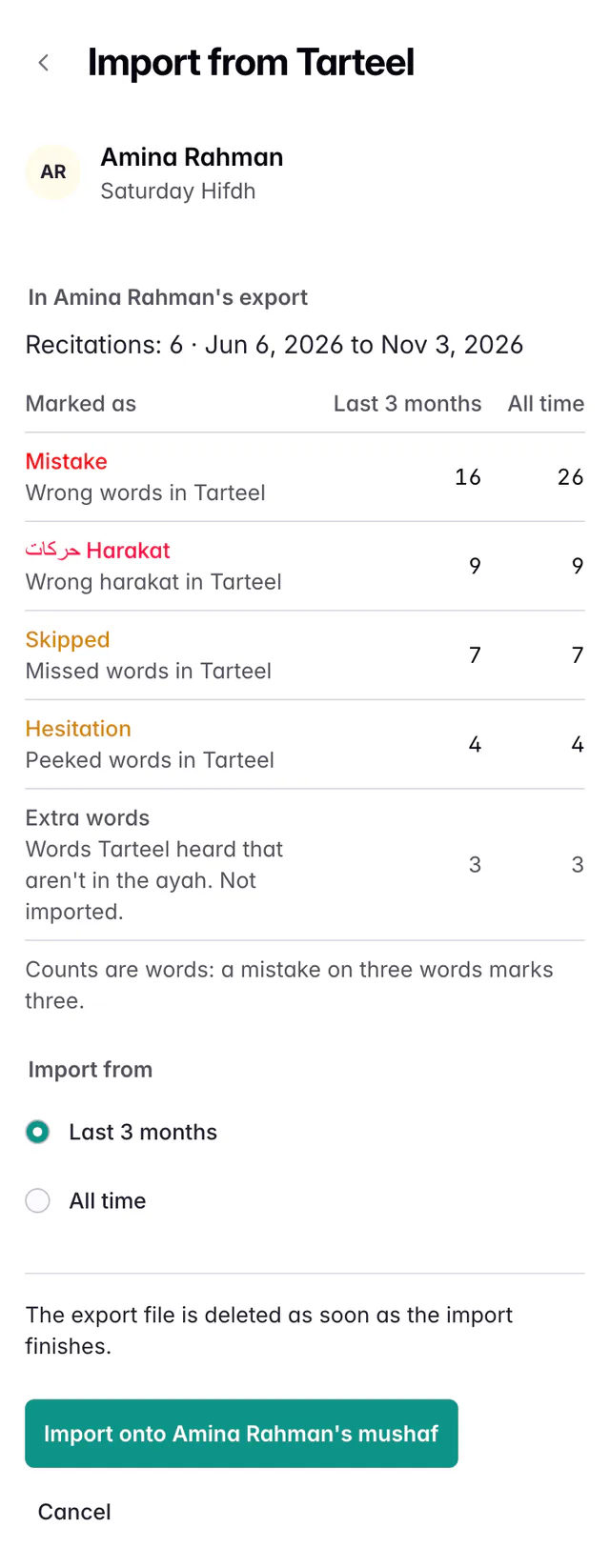
Check what’s in it, and choose
QuranPortal shows how many mistakes your export holds and how each kind will be marked: a wrong word as Mistake, a missed word as Skipped, a word you peeked at as Hesitation and wrong harakat as Harakat. Counts are words, so a mistake Tarteel heard on three words marks all three.
- Last 3 months or All time: how far back to go, counted from the day you import. Three months shows what you’re working on now; older mistakes may already be fixed.
- Extra words: words Tarteel heard that aren’t in the ayah. The preview counts them, but they’re never imported: Tarteel places them on the next word, so the mark would land on the wrong word.
Press Import. You can leave the page while it works.
After the import
Press View mistakes to see them, or open your mushaf. Each mistake is circled on its word. A word with the same mistake more than once has another loop around it for each time, up to three, and its mistake sheet shows how many times (×2, ×3).
When you read a word correctly now, open it and press Corrected. The mark stays as a faint, dashed loop, so you still see there was a problem there. If the mistake comes back, mark it with Repeated and the loop returns.
Importing for a student
Parents and guardians: open your child’s Mistakes page and choose Import from Tarteel, or find it under ··· on their pages. Check the name at the top before you press import: the mistakes land on that student’s mushaf. The file is always deleted when the import finishes.
Teachers and admins: the export comes from the student’s own Tarteel account, so the simplest way is for the family to import it from the student’s Mistakes page. If they pass you the zip, you can upload it there yourself.
If your Mistakes page has no Import from Tarteel, ask your family or teacher to import it for you.
An export already imported for another student in the account can’t be imported again until that import is deleted, so one student’s mistakes don’t end up on another’s mushaf. Anyone who can import for a student can see and delete that student’s imports.
What’s kept
QuranPortal reads only the mistakes in your export, and deletes the file as soon as the import finishes. A file you uploaded but never imported is deleted within two days.
Delete an import
Open Import from Tarteel and choose the import under Earlier imports. Delete import takes the mistakes it added off your mushaf. Mistakes you marked yourself aren’t touched.
Questions and answers
If I import the same export twice, will my mistakes double?
No. QuranPortal remembers each Tarteel mistake it imported and skips it the next time, so you can import a newer export later and only what’s new is added.
Are my recordings imported?
Not yet. The import brings in the mistakes Tarteel heard. Your recordings stay in Tarteel.
Who can see the imported mistakes?
They are on your mushaf like any other mistake, so anyone who can see your mushaf in QuranPortal can see them.
Still stuck?
Tell us what you were trying to do and we’ll help. Email support@quranportal.io. Need to chat with the team? Join our WhatsApp group.